
Free Resume Maker with 100 Templates
Fill in a simple form, watch your resume update on a live A4 page, and download it as a PDF or Word file. Everything stays on your device.
- Runs in your browser
- No sign-up, no watermark
- 100 templates
- PDF with real text
- Editable DOCX
This free resume maker runs entirely in your browser. Type your details into a step-by-step form on the left and a live A4 preview on the right shows the result as you go. Pick from 100 templates in ten styles, change the colour, font, size and spacing, then download a PDF with real, selectable text, an editable DOCX, an image, plain text or HTML. There is no account, no watermark and nothing to pay, and your work is saved only in this browser.
How to make a resume in four steps
1. Fill in your details
Start with your name and contact details, then add experience, education and skills. Every section is optional.
2. Choose a template
Open the template picker, filter by style or search, and switch as often as you like without losing anything.
3. Polish it
Adjust colour, font, size and spacing, check the completeness score and ATS checklist, or fit everything onto one page.
4. Download
Save a PDF or Word file, print it, or keep a JSON copy so you can edit the same resume later.
What this free tool does
Private by design
Your resume is built in this tab and auto-saved to your browser's local storage. Nothing is uploaded.
100 distinct templates
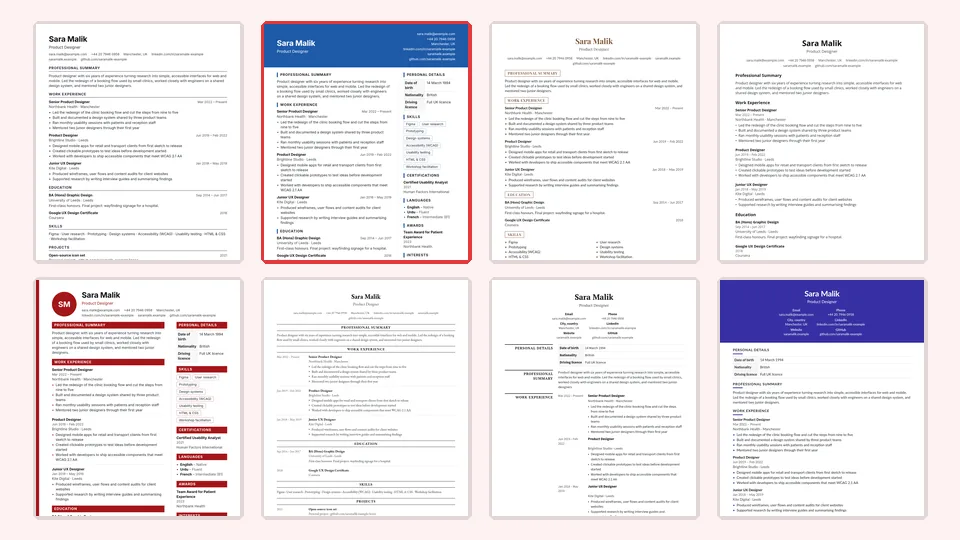
Ten base layouts with single-column, two-column, sidebar, header-band, timeline, Europass-style and biodata designs.
PDF with real text
The PDF is drawn as text, not as a screenshot, so it can be searched, copied and read by applicant tracking systems.
Editable Word file
The DOCX download opens in Word, Google Docs or LibreOffice with real headings, tabs and bullet lists.
Smart, offline helpers
Action verbs, skill ideas by job, a completeness score, an ATS checklist and a job-advert keyword matcher.
Letters included
Cover letter, resignation letter, reference letter, biodata and an email signature reuse your details.
Who uses it
First job seekers
Students and graduates can lead with education and projects using the Student templates.
Career changers
Reorder sections so transferable skills and recent courses appear first.
Applications abroad
Europass-style layouts suit European forms; Biodata layouts suit South Asian and Gulf applications.
Academics
Academic CV templates handle long publication lists, grants and teaching in a dense, numbered format.
Free vs Pro: what you pay for
Free · this tool
Free Resume Maker
- Unlimited resumes and letters
- Data stays on your device
- 100 templates, PDF, DOCX, PNG, JPG, TXT and HTML
- No account, no watermark, no credits used
Pro credits · Pro AI tools
Enhance, upscale, restore
- Credits are only for Pro AI processing
- 5 free Pro credits every week with an account
- Charged only when a job succeeds
- Format tools like this one stay free
What this free resume maker does
A resume has one job: to get you an interview. That means it must be easy for a busy recruiter to scan in seconds and easy for software to read. This tool is built around those two needs. The form asks for information in the order recruiters expect, the templates keep text as text, and the preview shows exactly what the downloaded file will look like, including where each page ends.
Because the whole tool runs in your browser, you can use it on a library computer, a work laptop or a phone without creating an account. Close the tab and come back later on the same device, and your draft is still there. Use Save as JSON to move it to another computer.
- Personal details with optional LinkedIn, website, GitHub and portfolio links, plus an optional photo you can crop or hide
- Summary, work experience, education, skills with optional level bars, projects, certifications, languages, awards, volunteering, publications, interests and references
- A custom section you can name yourself, such as Licences or Exhibitions
- Drag-and-drop section ordering, with arrow buttons for keyboard users
100 templates, built on ten base layouts
Every template starts from one of ten named base layouts and then changes its structure and style: where the columns sit, how headings are drawn, how dates line up, how skills are shown and which fonts are paired. That is why no two templates are simply recolours of each other. Thumbnails in the picker are drawn live, using your own details once you have typed your name, so you can see your resume in each design before you choose.
| Family | Typical layout | Best for |
|---|---|---|
| Simple | Single column, clear headings | Most job applications |
| Modern | Header band, timeline or tinted sidebar | Tech, marketing, product roles |
| Classic | Centred name, serif type, ruled headings | Law, finance, public sector |
| Minimal | Lots of white space, quiet headings | Design-aware employers |
| Creative | Coloured sidebar, initials badge, bold accents | Design, media, hospitality |
| Professional | Two columns with skills alongside | Experienced hires and managers |
| Student | Education and projects up front | Internships and first jobs |
| Academic | Dense CV, numbered publications | Research and teaching posts |
| Europass | Label column on the left | European applications |
| Biodata | Personal details table, photo | South Asian and Gulf applications |
Switching templates is instant
Your content is stored separately from the design, so you can try a sidebar layout, then a classic one, then go back, and nothing you typed is lost. Colour, font, font size and spacing work on top of any template, and you can return to the template's own settings at any time.
Getting past applicant tracking systems
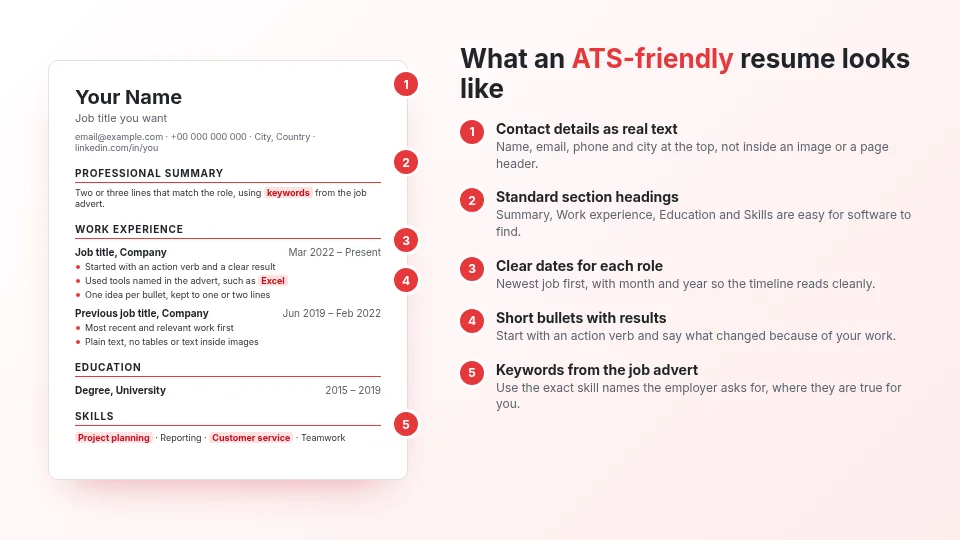
Many employers load resumes into an applicant tracking system (ATS) that pulls out names, dates, job titles and keywords. These systems struggle with text inside pictures, unusual headings and layouts built from tables. All 100 templates use real, selectable text and standard section names, and the PDF is written as text rather than as a flat image.
- Use standard headings such as Work Experience, Education and Skills. You can rename sections, but keep the names familiar.
- Give every job a start date and an end date, or tick that you still work there.
- Start bullets with an action verb and keep each one to a line or two.
- Mirror the wording of the job advert where it truthfully describes your experience.
- If an employer asks for Word, send the DOCX; otherwise a PDF keeps your layout fixed.
Single column or two columns?
Modern systems read most two-column resumes, and this tool writes the main column first so the reading order stays sensible. If you are applying through a large job portal and want the safest option, pick a single-column template from the Simple, Classic or Minimal families. The ATS checklist in the helper panel flags this for you.
Smart helpers that work offline
The helpers use simple rules rather than paid AI, so they work without an internet connection once the page has loaded and they never send your text anywhere.
- Completeness score: a percentage with specific tips, such as adding numbers to your bullets or writing a short summary.
- ATS checklist: dates, contact details, weak openings like “Responsible for”, very long bullets, page count and word count.
- Action verbs grouped by leadership, achievement, creation, analysis, communication and organisation, ready to copy.
- Skill suggestions for twelve job areas, from software and design to nursing, teaching and retail. One click adds a skill.
- Keyword matcher: paste a job advert to see which of its key terms already appear in your resume and which are missing.
- Fit to one page: gently reduces font size and spacing until the resume fits on a single A4 page, if that is possible at a readable size.
Your browser's own spell checker underlines mistakes in every text box. Use the sample data button to see a finished example before you start, then clear it and add your own details.
Download formats and what each is for
The PDF uses the same fonts and the same page breaks as the preview, so what you see is what you get. The DOCX keeps your colour and fonts but uses a clean single-column structure, because complex layouts rarely stay tidy when someone else edits them in Word.
| Format | What you get | Use it for |
|---|---|---|
| A4 pages with selectable, searchable text and clickable links | Applying online and emailing | |
| DOCX | An editable Word file with headings, tabs and bullet lists | Employers who ask for Word, further editing |
| PNG / JPG | One high-resolution image per page | Previews, portfolios and messaging apps |
| TXT | Plain text in a clean order | Pasting into online application forms |
| HTML | A single web page with the same design | Hosting your resume on your own site |
| JSON | Your data in a file you can load again | Backups and moving to another device |
Cover letters, resignation letters and more
Tabs above the form open five extra documents that reuse your name and contact details and match the colours and fonts of your chosen template. Each one exports to PDF and DOCX.
- Cover letter with recipient, company, subject and a starting draft built from your experience
- Resignation letter with your last working day
- Reference letter for a colleague or former team member
- Biodata, including marriage biodata, with an editable table of personal and family details
- Email signature with three layouts and a button that copies the HTML for Gmail, Outlook or Apple Mail
English, Urdu and Arabic
The tool's labels and section headings are available in English, Urdu and Arabic. Choosing Urdu or Arabic switches the preview to right-to-left. Arabic-script words use Noto Naskh Arabic while Latin words keep the template's font, so mixed names and email addresses still display correctly.
Privacy and honest limits
Your details never leave your device. They are kept in this browser's local storage so you can return to them; private or incognito windows forget them when closed, and Clear all data removes everything at once. The libraries the tool uses for PDF, Word, images and photo cropping are loaded from this site only when you need them.
A few limits are worth knowing. Very long Arabic or Urdu lines that mix scripts can space slightly differently in the PDF than on screen. The Word file uses one column whatever template you choose. And no template can make up for missing content: a clear summary, results with numbers and a tidy list of relevant skills matter far more than design.
Frequently asked questions
Related tools
Need sharper, bigger or restored photos?
Our AI tools enhance, upscale and repair images for free on your device, with optional Pro AI processing on credits.