
Passport Photo Maker: Correct Size, White Background
Turn a phone selfie into a correctly sized passport or visa photo with a crop guide, clean background and a ready-to-print sheet.
- Runs in your browser
- No upload, no account
- Free and unlimited
- 10 country sizes
- 4×6 print sheet
This free passport photo maker crops your picture to official sizes such as the US 2×2 inch and the 35×45 mm format used in the UK, EU, India and Pakistan. Line up the head with the guide, replace the background with white or light grey, and download a single photo plus a 4×6 inch print sheet. It all happens in your browser.
How to make a passport photo at home
1. Add a photo
Use a well-lit, front-facing photo on a plain background.
2. Choose the document
Pick the country and size, such as US 2×2 in or 35×45 mm.
3. Line up the head
Drag and zoom until the head fits between the red lines.
4. Download
Save the photo and the 4×6 print sheet.
What this free tool does
Country presets
US, UK, EU, India, Pakistan, Canada, Australia, China and Japan.
Crop guide
Crown and chin lines with a face oval for each size.
Background replacement
White, light grey or light blue, on your device.
300 DPI output
Exact pixel sizes, such as 600×600 or 413×531.
4×6 print sheet
Several copies with cut lines for any photo lab.
Private
Your photo is never uploaded or stored.
Who uses it
Passport renewals
Prepare the photo before filling in the online form.
Visa applications
Match each embassy's size in minutes.
ID cards and permits
CNIC, residence permits and student cards.
Printing at home or a lab
Print a 4×6 sheet for a few cents.
Free vs Pro: what you pay for
Free · this tool
Passport Photo Maker
- Unlimited passport photos
- Runs in your browser, no upload
- Crop guide, white background and 4×6 sheet
- No account, no watermark, no credits used
Pro credits · Pro AI tools
Enhance, upscale, restore
- Credits are only for Pro AI processing
- 5 free Pro credits every week with an account
- Charged only when a job succeeds
- Format tools like this one stay free
What makes a valid passport photo?
Every country publishes rules for passport and visa photos. They usually cover the print size, how much of the frame the head should fill, a plain light background, even lighting with no shadows, a neutral expression with the mouth closed, eyes open and looking at the camera, and no filters or heavy retouching. Glasses are banned for many documents.
Size is the part people most often get wrong, and it is the part this tool handles precisely. Each preset knows the paper size and the expected head height, and the guide shows where the top of the head and the chin should be.
Rules differ by country
Passport photo requirements by country differ more than you might expect. The United States uses a 2 by 2 inch square with a head of 25 to 35 mm. The UK, Schengen countries, India, Pakistan, Australia and Japan use 35 by 45 mm, with slightly different head heights. Canada uses a larger 50 by 70 mm, and China 33 by 48 mm. Always check the latest rules on the official website of the issuing office before you submit.
How to use the passport photo maker
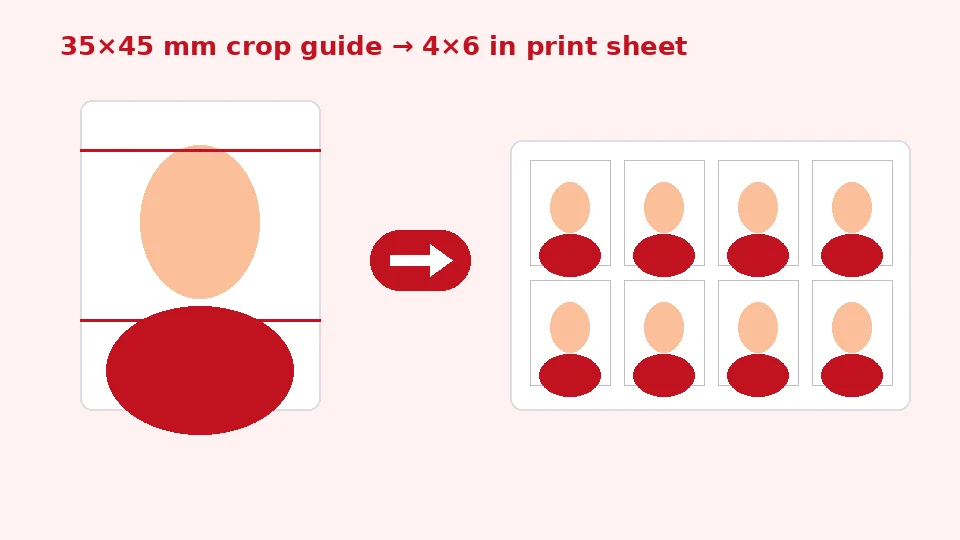
Add a photo taken straight on, at eye level, in good light. Choose the document from the list. The photo appears in a frame with two red dashed lines and an oval. Drag the picture and use the Zoom slider until the top of the head touches the upper line, the chin touches the lower line, and the face sits in the centre of the oval.
Choose a background, then press Make passport photo. The finished photo appears on the right with its pixel size, followed by a 4×6 inch sheet with as many copies as fit. Download whichever you need.
Taking the photo
To take a passport photo with your phone, stand about a metre from a plain wall facing a window, ask someone else to hold the phone at eye level, and avoid the wide selfie camera, which distorts faces at close range. Take several shots and pick the sharpest one with a neutral expression.
Sizes and resolution
United States and India visa
A 2x2 passport photo for the United States or an Indian visa is 600 by 600 pixels at 300 DPI, which is what this tool exports. Online US applications accept the digital file, and printed copies should be exactly 2 by 2 inches.
The 35×45 mm format
The 35x45 mm photo size used in the UK, the EU, India, Pakistan, Australia and Japan becomes 413 by 531 pixels at 300 DPI. Some online systems ask for different pixel dimensions; in that case resize the downloaded file with our image resizer, and use our tool for compressing to an exact KB size if there is a file size limit too.
Background and lighting
Most documents require a plain white or off-white background. The Replace with white option detects the background around the edges of the photo and replaces it on your device. It works best when the original background is plain and clearly different from hair and clothing, such as a light wall. Busy backgrounds, or hair that matches the wall, can leave traces, so take the photo against a plain wall when possible.
This is a simpler, purpose-built version of what our AI background remover does. If you need a perfect cutout from a complicated scene, use the AI white-background tool first and then crop the result here. Light grey and light blue are offered because some countries accept or prefer them.
Lighting tips
For a passport photo with white background straight from the camera, stand half a metre in front of the wall to avoid shadows, and face soft daylight. Even lighting means the background replacement has less to fix and your skin tones stay natural.
Printing your photos
The print sheet is 4 by 6 inches, the most common photo print size, also sold as 10 by 15 cm. Upload it to any photo lab or pharmacy kiosk, or print at home on photo paper. Choose 100% or actual size in the print dialog, never fit to page, otherwise the photos will be the wrong size. Cut along the grey lines.
To print passport photos at home cheaply, a single 4×6 print usually costs far less than paying for photos at a studio, and you get several copies from one sheet.
Privacy and limits
Your photo is processed in your browser and never uploaded or stored, which matters for identity documents. The tool is free, unlimited, adds no watermark and does not use EnhancerPro credits.
We cannot guarantee that an authority will accept a photo; officials judge expression, lighting and image quality as well as size. Following the guide and the rules on the official website gives you the best chance.
When to use a professional
Some applications, such as certain visas or children's passports, have strict extra requirements. If an office rejects home-made photos or requires a studio certificate, use a professional photographer.
Common reasons photos are rejected
Wrong head size
If the head is too small or too large in the frame, the photo is often refused. The red guide lines exist to prevent exactly this. Take your time aligning the top of the head, not the top of the hair style, with the upper line where the rules allow, and keep the chin on the lower line.
Shadows and uneven light
Shadows on the face or behind the head are a frequent problem. Face a window with soft daylight, switch off coloured lamps, and stand away from the wall. Avoid flash directly in front of the face, which can create reflections and red eyes.
Expression, glasses and head coverings
Most countries require a neutral expression with the mouth closed and both eyes clearly visible. Many no longer allow glasses at all. Head coverings are usually allowed only for religious or medical reasons, with the full face visible from the bottom of the chin to the top of the forehead.
Edited or filtered photos
Beauty filters, smoothing and colour effects are not allowed. This tool only crops, resizes and replaces a plain background; it does not retouch your face. Turn off portrait and beauty modes on your phone camera before taking the picture.
Old photos
Most offices require a photo taken within the last six months, so your appearance should match how you look today. Reusing an old photo from a previous application is a common reason for delays.
Digital submissions
Many countries now accept digital photos for online applications. Upload the single photo file rather than the print sheet. If the website asks for a particular file size, for example under 240 KB, the 300 DPI JPG may already fit; if not, our compress to 100KB tool can bring it under the limit without changing its dimensions. Keep the original file in case you need to resubmit.
Photos of children
Babies and young children are allowed some flexibility in many countries, but the face must still be clear and the background plain. Lay a baby on a white sheet and photograph from above in daylight, then line up the head in the guide as usual. Several attempts are normal.
Frequently asked questions
Related tools
Need sharper, bigger or restored photos?
Our AI tools enhance, upscale and repair images for free on your device, with optional Pro AI processing on credits.