
Remove EXIF Data and GPS Location from Photos
See exactly what your photos reveal, then strip the hidden details in one click, without uploading anything.
Drop image files here, or click to choose
JPG, PNG or WebP · up to 50 files · 50 MB each · Ctrl+V to paste · nothing is uploaded
- Runs in your browser
- No upload, no account
- Free and unlimited
- No watermark
- Batch + ZIP download
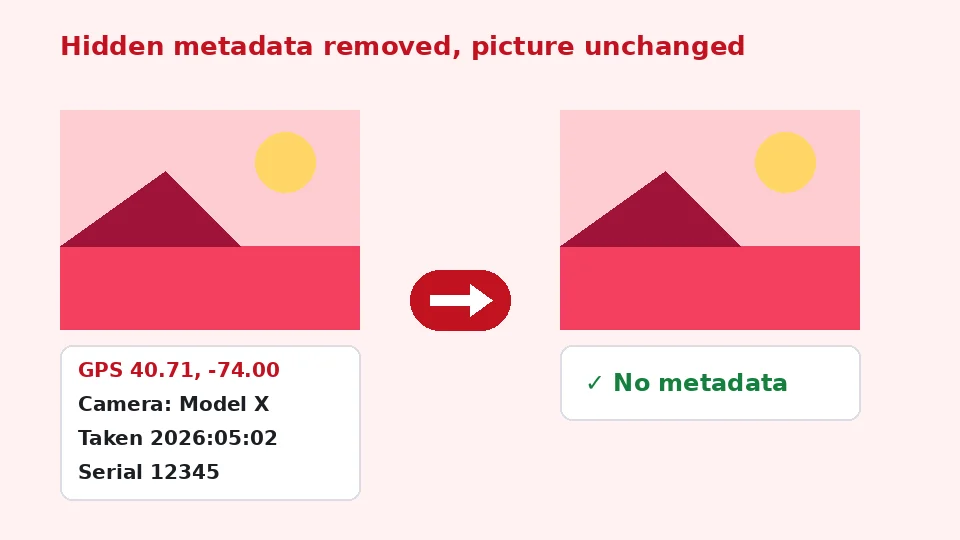
Use this free tool to remove EXIF data from JPG, PNG and WebP photos right in your browser. It shows what each file contains, including GPS location, camera model, serial number and the date taken, then removes it all in bulk. Every cleaned file is checked again, so you know nothing was left behind, and your photos never leave this device.
How to remove metadata in four steps
1. Add photos
Drop JPG, PNG or WebP files, browse, or paste with Ctrl+V.
2. Review
See the GPS position, camera, dates and other details found.
3. Choose orientation
Keep phone rotation applied, or strip everything with no re-encoding.
4. Download
Save each clean file or all of them as a ZIP.
What this free tool does
Shows what is hidden
Camera, lens, serial, dates, software and text fields at a glance.
GPS warning
Location is flagged in plain words, without loading any map.
Lossless removal
Metadata blocks are cut out; image data is not re-compressed.
Orientation kept
Optionally bakes rotation into pixels so photos stay upright.
Verified output
Each cleaned file is scanned again and marked as clean.
Batch and private
Up to 50 files at once, processed on your device.
Who uses it
Selling online
Post marketplace photos without revealing your home address.
Social and forums
Share pictures without the camera serial or exact time.
Journalism and research
Protect sources before publishing images.
Work documents
Strip author and software fields from screenshots and scans.
Free vs Pro: what you pay for
Free · this tool
Remove EXIF Data
- Unlimited conversions
- Runs in your browser, no upload
- Batch up to 50 files and ZIP download
- No account, no watermark, no credits used
Pro credits · AI cloud tools
Enhance, upscale, restore
- Credits are only for AI cloud processing
- 5 free cloud credits every week with an account
- Charged only when a job succeeds
- Format tools like this one stay free
What is EXIF data?
EXIF, short for Exchangeable Image File Format, is a set of notes that cameras and phones write into every photo. It records the make and model of the device, lens details, exposure, the date and time the picture was taken, the software used to edit it and often the exact GPS position. Many images also carry XMP and IPTC blocks with captions, keywords, author names and copyright lines.
This information is useful for organising a photo library, but it travels with the file wherever you send it. Anyone who downloads the original can read it with free software in seconds.
Hidden details in everyday photos
Photo metadata can reveal far more than people expect. A picture of a sofa you are selling can carry the coordinates of your living room. A holiday snap can show the time you left home. A camera serial number can link images posted under different accounts to the same person.
Why remove metadata from photos
Privacy is the main reason. If you share images on marketplaces, dating apps, forums, blogs or in email, cleaning them first means only the picture is shared, not the story behind it. Some platforms strip details on upload, but many do not, and files sent by email, messaging apps in document mode or cloud links usually keep everything.
There are practical reasons too. Removing large blocks such as embedded thumbnails and maker notes can save a few kilobytes per image, and it keeps author or software names out of files you hand to clients.
Is EXIF data a privacy risk?
For most photos, the biggest risk is location. A single geotagged picture taken at home, at school or at work can reveal a routine. Dates and device details add context. That is why this tool flags GPS coordinates prominently, in words rather than on a map, so nothing about your location is sent to a map service.
How to remove EXIF data with this tool
Add your photos and the tool reads every metadata block it can find. For each file you see the kinds of data found, such as EXIF, GPS, XMP, IPTC or text, followed by the most important fields. Press Remove metadata and each file is rebuilt without those blocks. The output is then scanned again, and a green check confirms that no EXIF, GPS, XMP or text data remains.
This works as a photo metadata remover for single pictures and for whole folders. Batch EXIF removal handles up to 50 files in one go, with a ZIP button to download everything together.
Location data
To remove GPS location from photos you do not need any special setting. Location is stored inside the EXIF block, so it disappears together with the rest. The warning on each file tells you which ones carried coordinates, which is handy if you want to know which pictures were exposed before.
Orientation and image quality
Keeping photos upright
Phones often save pictures sideways and add a rotation note. If that note is removed, the photo can appear on its side. With Keep orientation applied, files that carry a rotation are turned the right way in the pixels first and then saved without any metadata. Files without a rotation are cleaned losslessly.
Lossless option
Choose Remove everything, no re-encoding, and the tool cuts out metadata blocks while copying the compressed image data byte for byte. That lets you remove EXIF without losing quality, because the picture is never decoded and saved again. JPG stays JPG, PNG stays PNG and WebP stays WebP. Colour profiles are kept, since they hold colour information rather than personal details.
Devices and formats
To strip EXIF data on iPhone, open this page in Safari, choose photos from your library and save the cleaned copies. iOS also offers a location toggle in the share sheet, but it does not remove other fields such as the device model. On Android, Chrome works the same way.
To delete EXIF data on Windows you can use the file properties dialog, but it often leaves some fields behind and handles only a few files at a time. Mac users can remove location in Photos, yet camera and date details stay. This page cleans everything in one pass on any system, with nothing to install.
Supported files
JPG and JPEG photos, PNG images with eXIf or text chunks, and WebP files with EXIF or XMP chunks are supported. Files up to 50 MB each can be added. HEIC photos can be converted first with our HEIC to JPG tool and then cleaned here.
What this tool does and does not do
The tool removes EXIF, GPS, XMP, IPTC, comments and PNG text fields, along with maker notes and other application blocks. It does not change what is visible in the picture. If a street sign, a face or a number plate in the image itself gives away a location, use our blur tool to hide it before sharing.
If you want to see EXIF data only, without changing anything, simply add the files and read the summary; nothing is altered until you press the button. It never uploads files and does not use EnhancerPro credits. When you also want to brand the images, add a watermark after cleaning them.
Common questions about photo privacy
Do social networks remove metadata?
Large social networks usually remove most metadata from the copies they display, but they may keep the original details on their own servers, and the rules change over time. Messaging apps differ as well: a photo sent as a picture is often compressed and cleaned, while the same photo sent as a file arrives untouched. Cleaning images yourself before they leave your device is the only way to be sure what you share.
Screenshots and edited images
Screenshots rarely contain GPS data, but they can include the device name, the software version and the time they were taken. Images exported from editing apps often carry the software name, editing history and sometimes the original camera data. Running both through the tool takes seconds and removes those traces too.
Keeping a private archive
Metadata is valuable in your own library. Dates help sort holidays, and locations make it easy to find pictures from a trip. A sensible approach is to keep originals with all their details in a private archive and only share cleaned copies. Because this tool always writes new files and never edits the originals, that workflow comes naturally.
Business and legal use
Teams that publish user photos, case studies or evidence often need to remove identifying details consistently. Processing a whole folder at once, with a clear verified result for each file, makes it easy to follow a simple routine before anything is published. If a file shows a red warning instead of a green check, review it before sharing.
Sharing originals safely
Cloud links and email attachments usually deliver the exact original file. If you send full-resolution photos to a printer, a client or a friend, clean them first so the recipient receives only the image. It takes a few seconds for a whole album.
Quick routine
Add, review, remove, download: four steps that become second nature. Doing it every time you share keeps surprises away.
Frequently asked questions
Related tools
Need sharper, bigger or restored photos?
Our AI tools enhance, upscale and repair images for free on your device, with optional cloud processing on Pro credits.